Segments
Group your customers by tags and behaviour — orders, spend, forms, abandoned checkouts — into lists that update by themselves.
A segment is a saved group of customers defined by conditions. Customers move in and out by themselves as they buy, fill in forms and get tags — you never update it by hand.
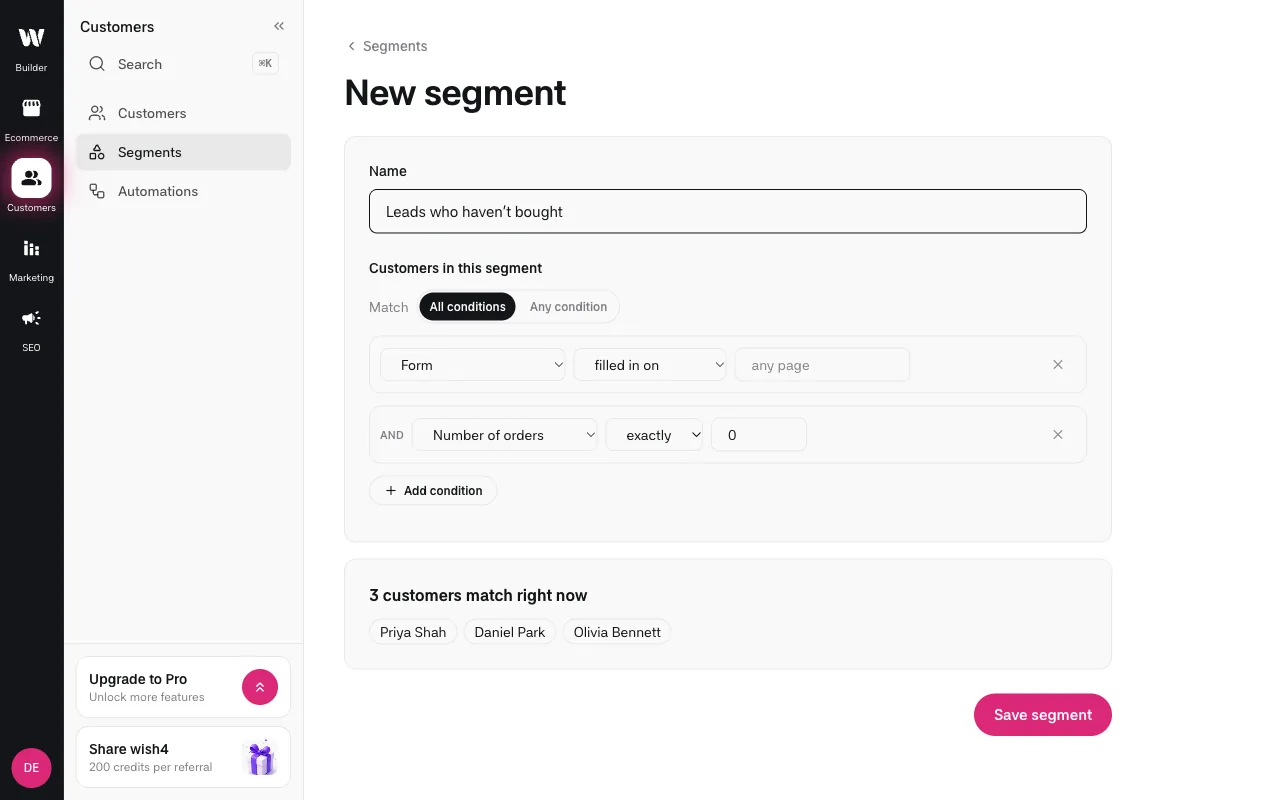
Build a segment
Go to Customers → Segments and click New segment — or start from *Repeat buyers*, *Leads who haven't bought* or *Gone quiet*.
Pick a condition, how it compares and a value — e.g. *Number of orders · at least · 2*. With more than one, choose All conditions or Any condition.
As you edit, the count shows how many customers match right now, with a few of their names.
Give it a name and save. View opens the customer list filtered to the segment.
Conditions
- Tag — has / doesn't have a tag.
- Number of orders and Amount spent — at least, at most, or exactly.
- Last order, Became a customer and Last activity — in the last N days, or not.
- Form — filled in a form, or never, optionally only on pages containing an address like
/contact. - Product — bought a product, or never.
- Abandoned checkout — in the last N days.
- Site, Country and Email marketing (subscribed, unsubscribed or no email).
Automations can use a segment as a condition: *“only if the customer is in VIP”*.